Register for part 2 of our Device Identity Webinar Series!

Add verified device identity to Microsoft Entra ID authentication

Smallstep strengthens the credentials behind Entra ID sign-in by issuing certificates only to approved, inventoried devices, with hardware-backed keys where the platform supports them.

Get a demo
background gradientbackground texture
Complements Conditional Access
Issued only to approved inventory
Hardware assurance where supported
Phishing-resistant authentication
Windows, macOS, Linux, ChromeOS
Automated certificate lifecycle

What Conditional Access already covers, and what it leaves open

Conditional Access can require compliance and recognize device identities such as the TPM-bound Primary Refresh Token. Those controls stay. What they do not establish is that a certificate was issued only after a check of the device's hardware against the inventory you approve.

  • Compliance describes management state, not whether a credential went to approved hardware.
  • Coverage varies by OS, enrollment method, and browser.

Go beyond device compliance with hardware-backed credential issuance

Before a certificate is signed, Smallstep checks that the device is approved in your inventory, synced from Intune or your MDM, and on supported platforms verifies TPM or Secure Enclave attestation. Entra ID keeps users, groups, and policy. Smallstep adds assurance at the moment a credential is created.

User factors and device factors are two different questions

Windows Hello for Business, Authenticator, and passkeys answer "is this the right person?" A device credential answers "is this a machine we issued?" The two layers complement each other.

  • A push or passkey confirms a person, not the laptop running the session.
  • Neither consults your hardware inventory before access.
  • A device certificate speaks for the device, not for who is sitting at it.

Smallstep's certificate exists only because the device passed an inventory check and, where supported, a hardware attestation. Existing sessions still rely on Entra's token protections.

Certificate-based authentication, with the device as the factor

You add Smallstep’s issuing CA to Entra certificate-based authentication. Smallstep issues each user a certificate on their inventoried device, and Entra maps it to the account. Entra counts it as the device factor; Conditional Access pairs it with a user factor for the apps that need both. On managed devices the certificate is pre-selected by browser policy.
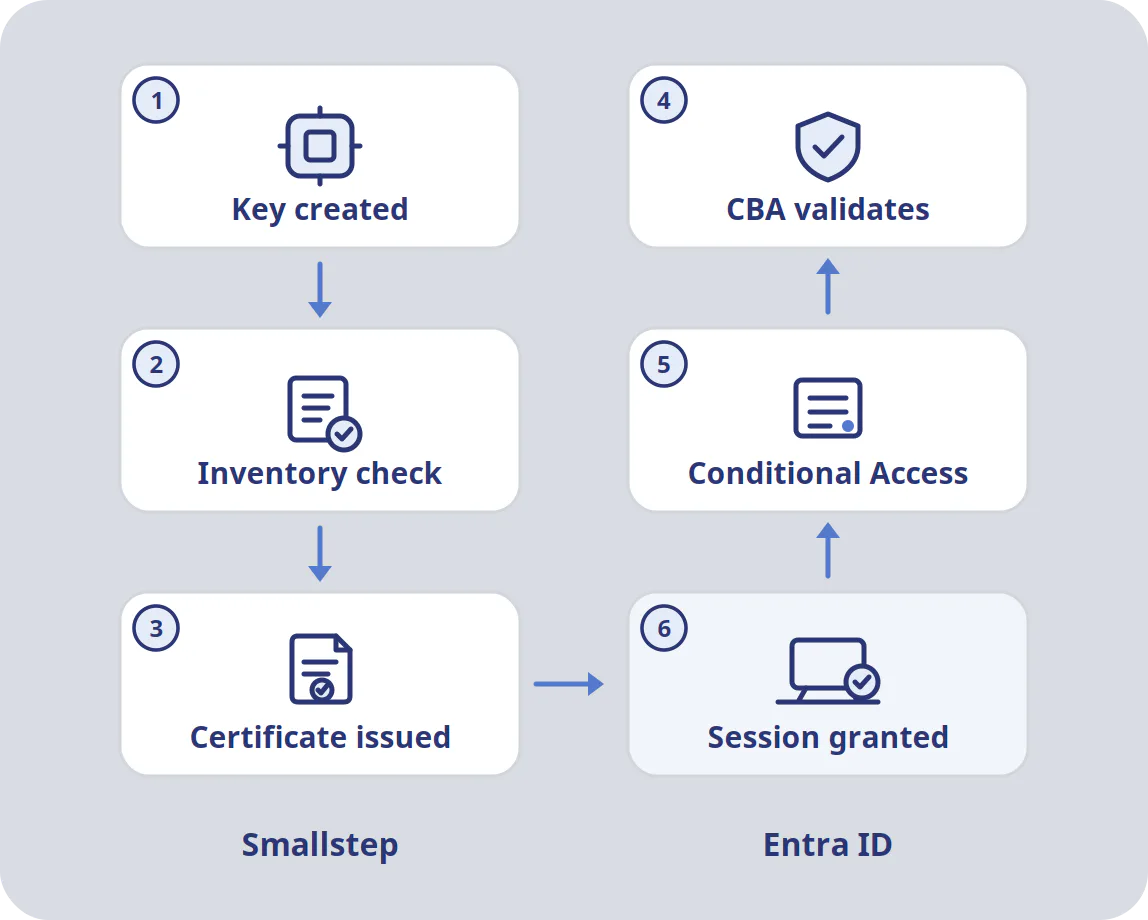
Entra CBA flow: device certificate issued by Smallstep, validated by Entra at sign-in.

Entra ID integrates with Smallstep at two points

Users and groups come from an Entra enterprise application over OIDC and SCIM. Devices come from your Intune or MDM integration. At sign-in, Entra's own certificate-based authentication does the checking; Smallstep is not in the request path.

Entra ID continues to own users, Conditional Access, and app assignments. Smallstep owns which devices get a credential and how its key is protected.

Validate the flow on one Windows device end to end before rolling it into policy.

How device identity and key protection work

Key benefits for Entra ID customers

Credentials only for approved hardware

Every certificate request is checked against your Intune or MDM inventory before signing. A device you did not approve gets nothing, whatever it claims about itself.

Hardware attestation where it exists

Windows and Linux TPMs, Macs on MDM device enrollment (Apple silicon, macOS 14+) via Apple’s Managed Device Attestation, and ChromeOS via Verified Access give device-attested keys. Other platform and application combinations get the strongest protection they support, down to provisioned credentials; the FAQ below says what each one gets.

Phishing-resistant authentication

Certificate-based authentication has no code to type and no approval to trick. Combined with a user factor and the right binding policy, Conditional Access can require it for your highest-risk apps.

One customer’s Intune admin center was compromised through a single accidental MFA approval. A device certificate on the admin role removes that approval from the path.

Nothing for users to carry

Enrollment, issuance, and renewal happen through the agent or MDM. Users keep their Entra sign-in; the device credential arrives and renews without their involvement.

Beyond the Windows fleet

Smallstep issues device credentials on macOS, Linux, and ChromeOS as well as Windows, from the same inventory check and the same CA. Browser and Entra CBA behavior differ by platform and should be validated per client.

Defense in depth, not replacement

Keep token protection, Continuous Access Evaluation, and compliance policies. Smallstep adds a hardware-rooted answer to the question those controls cannot ask: was this credential ever issued to this machine?

Put issuance assurance behind the Entra ID sign-ins that carry the most business risk.

Your Entra ID controls stay where they are. Smallstep checks approved inventory and, where supported, hardware attestation before a certificate exists. Keep your most sensitive apps on credentials with a provenance.

Book a demo

FAQs Smallstep for Entra ID

Conditional Access evaluates the signals it is handed: compliance state, join type, risk, location, authentication strength. Smallstep does not modify any of those. It strengthens the issuance assurance of a certificate that Entra then accepts as an authentication method: the certificate exists only because the device was in your inventory and, on supported platforms, proved a hardware-resident key. Entra does not re-run that attestation at sign-in; it relies on Smallstep's issuance controls. The value is in who was allowed to get a credential in the first place.

Three configurations. An Entra enterprise application connects Smallstep to your tenant, OIDC for sign-in and SCIM for user and group provisioning (Entra ID P1 or higher). An Intune (or other MDM) integration gives Smallstep the device inventory. Smallstep’s issuing CA is added as a trusted certificate authority in Entra certificate-based authentication, with a username binding (UPN to start, high-affinity issuer-and-serial or subject key identifier for sensitive accounts) and an authentication binding policy that sets the factor strength.

Bind certificates from the Smallstep CA as single-factor. A Smallstep device certificate proves the machine, not the person, and Microsoft asks that multifactor certificates be protected by a PIN or biometric. Then require a CBA-based authentication strength that pairs it with a user factor: Entra supports CBA as the first factor with a passkey, FIDO2 security key or passwordless phone sign-in as the second. The result is phishing-resistant sign-in that needs both an approved device and the right person. Validate the combination per application before requiring it.

It depends on the browser and the policy. Entra redirects certificate sign-in to certauth.login.microsoftonline.com (or a tenant-specific certauth hostname with issuer hints), and that is the hostname your auto-select policy has to match. Edge and Chrome on managed Windows, macOS, and Linux can be told to pick the certificate there automatically; Firefox selects automatically when the security.default_personal_cert policy is set to “Select Automatically”; Safari selects from the keychain and prompts only when several certificates match. Certificate selection itself needs no push or code, but depending on the authentication strength required, Entra may still ask for an additional factor. Test the path on your own fleet before you promise anyone a silent experience.

On Windows and Linux the agent generates the key in the TPM and produces attestation evidence chained to the TPM’s endorsement key, which Smallstep validates against inventory before signing. On Macs on MDM device enrollment (Apple silicon, macOS 14+), Apple’s Managed Device Attestation does the same through the MDM. A cloned VM or a copied profile has no matching hardware root and is refused.

Windows (Edge, Chrome, Firefox), Linux (Chrome, Firefox), and ChromeOS (Chrome): device-attested keys, meaning the issuer verified hardware evidence before signing. Agentless macOS (MDA): device-attested in Safari, which is the Entra-relevant path. macOS through the Smallstep agent: Smallstep-attested keys, which prove possession of a Secure Enclave key but cannot remotely prove the key lives in a genuine Secure Enclave. Edge on macOS and Linux is handled case by case. Smallstep’s platform documentation lists this per browser and application; ask us for the current matrix for your fleet.

It narrows the problem rather than ending it. Where the Entra authentication certificate uses a non-exportable hardware-bound key, an attacker cannot copy that private key to another machine to complete a new sign-in. Some compatibility workflows use provisioned credentials with different protection properties, so check which credential your Entra flow actually uses. A token lifted after a legitimate sign-in is still a bearer token until it expires or is revoked. Pair Smallstep with short sign-in frequency, Continuous Access Evaluation, and token protection in Conditional Access to shrink that window.

Anything that signs in through Entra ID and that you scope to a CBA-based authentication strength: Microsoft 365, the Azure portal and admin centers, Entra-federated SaaS, internal apps behind Entra, and the AI consoles, copilots, and MCP-enabled tools increasingly placed behind the same sign-in.

Yes. Build a custom authentication strength that includes certificate-based authentication and target it at the apps, groups, or admin roles that carry the most risk. Everything else stays on your existing policy.

When a device loses approval, Smallstep stops renewing its certificate, and the certificate expires at the end of its short lifetime. With an active-revocation authority and a CRL accessible to Entra ID, outstanding certificates can also be revoked before expiry; timing depends on CRL publication and Entra’s caching. Configure the authority’s HTTP CRL distribution point in Entra. Without one, Entra does not check revocation at all. Existing Entra sessions remain subject to Microsoft session controls. Confirm the authority type, CRL endpoint, and latency on your tenant as part of acceptance. A replacement device can self-register through Entra ID SSO and is admitted once an admin approves it.

Yes. Devices outside the approved inventory do not receive a certificate, so they fall back to whatever Conditional Access policy you set for unmanaged devices. Inventory is not limited to MDM: a device can be admitted through self-registration, which an admin approves by default, or imported through the API, which approves it on import; either way it is not high-assurance until it attests. Contractors and lab machines can be brought in deliberately. That gives you a clean line between hardware you approved and everything else.

Yes. Those are user factors and they stay. Smallstep-issued certificates complement Windows Hello for Business, passkeys, and Authenticator rather than replacing them. Which methods satisfy a given Conditional Access authentication strength depends on your certificate binding policy and the authentication combinations Microsoft supports for each application.

Intune is the usual inventory source for Entra ID shops, but Smallstep also syncs with Jamf, Iru, Mosyle, Workspace ONE, and others, and accepts inventory through its API. Entra ID handles users either way.

Cloud PKI issues certificates to Intune-enrolled devices over SCEP as a separately licensed Intune add-on. It does not reach Linux or anything outside Intune, and SCEP enrollment carries no hardware attestation. Smallstep issues to the whole fleet from one inventory with attestation where the platform supports it, and Entra CBA trusts whichever CA you upload. See the Microsoft AD CS page for the fuller comparison.

Yes. The same device identity issues EAP-TLS Wi-Fi certificates, certificate-based VPN credentials, and mTLS client certificates for internal services, and Entra ID users can get SSH certificates for TPM or Secure Enclave keys through the Smallstep Agent. One inventory, one CA, many enforcement points.