Register for part 2 of our Device Identity Webinar Series!

You trust Microsoft Entra ID™ for user credentials. It trusts AD CS for the certificates.

Entra ID isn’t a certificate authority. It validates certificates your CA issued, against a root you upload into its trust store. Where that CA is AD CS, your Wi-Fi, VPN, and 802.1X rest on a Windows Server® role built for domain-joined Windows. Smallstep replaces it without touching your root.

Book a demo
background gradientbackground texture
Bring your own root
Hardware-attested enrollment
SCEP, NDES, and legacy protocol support.
Runs in front of AD CS
Short-lived certificates
Every platform, not just Windows

Entra ID validates certificates. Your CA issues them.

Turn on certificate-based authentication and Entra asks you to upload a CA into its trust store, then validates what users present against it. Cloud PKI can issue to Intune-enrolled devices, but it is a separate Intune add-on, it issues over SCEP, and it doesn’t reach Linux or anything outside Intune. Keep Intune and replace the CA behind it: Smallstep syncs your Intune inventory and delivers certificates through it.

  • Entra CBA trusts only the CAs you upload
  • Cloud PKI is Intune-only, SCEP-only, separately licensed
  • Wi-Fi, VPN, and 802.1X still run off your own CA

A modern identity platform is only as strong as the CA beneath it.

Microsoft hasn’t abandoned AD CS. Post-quantum ML-DSA support shipped for Windows Server 2025 in May 2026. What hasn’t changed is the shape of it. AD CS can prove a key lives in a TPM, but only for Windows clients enrolling against an enterprise CA through certificate templates, only for RSA keys, and not over SCEP or NDES, which carry no attestation and are how most of the fleet enrolls. Everything else gets a certificate with no proof of where its private key was born.

Attackers already have a playbook for this CA.

SpecterOps documented domain escalation through AD CS in Certified Pre-Owned. In nearly every network they assessed, low-privileged users “almost always had the ability to immediately compromise the Active Directory forest.” Template sprawl, permissive enrollment, and private keys sitting unprotected on servers are the normal state. Smallstep holds signing keys in an HSM (or your KMS when self-hosted), logs every use, and ships hardened defaults rather than relying on template hygiene.

Entra proves the person. Smallstep proves the machine.

Two different questions, and neither answer substitutes for the other. Entra establishes who the user is and which factor they presented. Smallstep establishes which machine the private key is on, by requiring that key to be born in a TPM or Secure Enclave and attested before anything is signed. We don’t replace Entra. We replace the CA it was already trusting.

Three ways in. None of them a cutover.

Replace AD CS outright. Or run both side by side, issuing from an intermediate signed by your existing root, and move one use case at a time. Or put Smallstep in front as a registration authority, so attestation happens before your existing CA signs. The deployment shape is a decision you make per environment, not a condition of getting started.

Keep the root. Every client already trusts it, Entra included.

Upload your AD CS root certificate, sign a Smallstep intermediate with it, and everything that trusts your existing root trusts the new CA from the first day, including the copy in your Entra trust store. No client re-trust, no fleet-wide reissue, no maintenance window. Your root private key never leaves your offline CA.
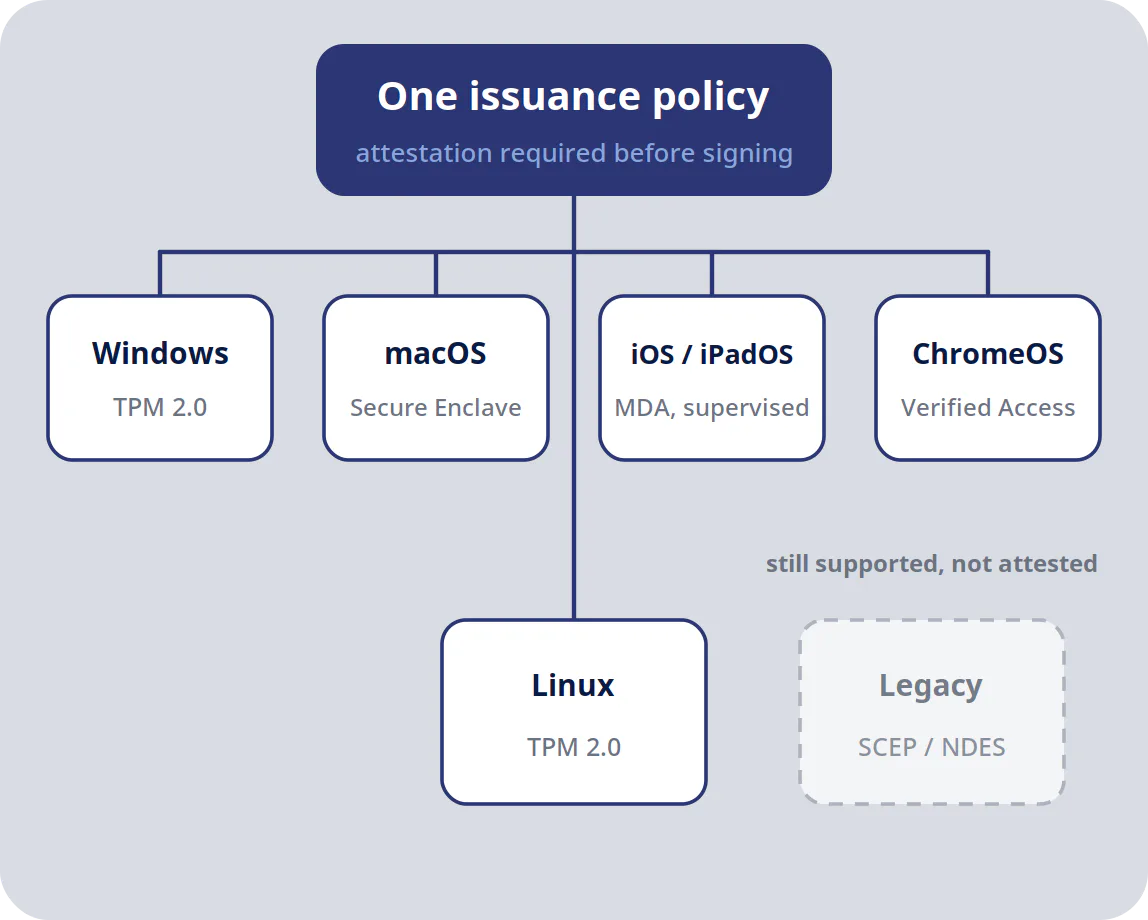
One PKI, every platform in the fleet.

Windows, macOS, iOS, Linux, and ChromeOS. Smallstep applies one issuance policy across them, anchored to the TPM, the Secure Enclave, or Verified Access, and keeps SCEP and NDES emulation running for whatever is not ready to move.

Keep Entra. Keep the root. Retire the server.

Hardware-attested enrollment, automated certificate lifecycle, and legacy protocol support so your clients do not have to change on day one. Migrate at the pace your network can absorb.

Book a demo

FAQs Smallstep for Microsoft PKI

For device identity workloads, yes: Wi-Fi, VPN, 802.1X, SSH, and mTLS all move cleanly. Smallstep operates as your primary certificate authority and issues hardware-attested device certificates directly. AD-integrated workloads like GPO auto-enrollment for domain controllers, smart card logon, and S/MIME stay where they are, which is why most teams run both for a period. Smallstep can also run as a registration authority in front of AD CS, or coexist alongside it during a phased migration. Most teams start by running the two side by side and moving one use case at a time.

No. Deploy Smallstep in parallel with your existing AD CS deployment and move one use case at a time. Wi-Fi first, then VPN, then browser and SSO enforcement is a common order. Devices keep operating throughout, and cross-signing is available during the transition.

You upload your existing AD CS root CA certificate to Smallstep, generate a CSR for a Smallstep intermediate, and sign that CSR with your offline AD CS root. Smallstep then issues from an intermediate that chains to the root your environment already trusts. The feature runs on Advanced Authorities.

Yes, if you bring your own root. Anything that already trusts your AD CS root will trust certificates issued by the Smallstep intermediate underneath it. There is no fleet-wide trust store update and no reissue project to schedule.

Yes. Smallstep runs a SCEP server and provides NDES emulation for Windows clients that expect the Microsoft role, so clients that speak SCEP today do not have to change when you cut over. Smallstep also supports dynamic SCEP, with a short-lived per-request challenge instead of a static shared secret. OCSP and CRL are available on Advanced Authorities.

Both are available on Advanced Authorities. A revocation service periodically queries the CA, builds and signs a CRL, and publishes it, while OCSP responses are signed and served on demand. Elsewhere the model is passive revocation, where revoking blocks renewal and short lifetimes do the rest.

Yes, for the certificates Smallstep issues. Each authority keeps issuance and renewal history, revocations, failed issuance attempts, and audit events, so you can see what was issued, to which device, and whether it renewed. Certificates already issued by AD CS or another CA are not tracked; most teams retire those through normal renewal as each use case moves over.

By taking renewal off the calendar. The Smallstep agent and ACME clients renew certificates automatically before they expire, and short lifetimes mean renewal runs continuously instead of once a year when nobody remembers the steps. When a device is revoked or leaves your MDM, renewal stops, so a lapsed certificate is a decision rather than an accident. The ROI calculator estimates the outage exposure this removes.

Three things converge. Microsoft is prioritizing Entra, which has no certificate services, so the AD dependency becomes conspicuous. The published attack research on AD CS misconfiguration has made it an audit finding rather than a background risk. And fleets are no longer domain-joined Windows, which is the only environment AD CS was designed for.

Hardware-attested issuance, which SCEP-based workflows cannot provide. Short-lived certificates with automated renewal. ACME support, including the device attestation challenge Smallstep engineers are credited with shaping in the IETF specification. Multiple issuing authorities from one platform instead of one CA per deployment. And consistent policy across macOS, Windows, Linux, and ChromeOS.

Yes. In registration authority mode, Smallstep performs attestation verification and policy checks, then forwards approved signing requests to your existing CA. That adds hardware-rooted enrollment to the PKI you already have without rearchitecting it. The same model works in front of AWS Private CA, Google Cloud CAS, Vault PKI, and HSM-backed on-prem CAs.

Yes. Hardware-bound credentials come from the TPM on Windows and Linux, the Secure Enclave on macOS, and Verified Access on ChromeOS. Apple devices enroll through Managed Device Attestation on supervised, MDM-managed hardware. Assurance level varies by platform and application, and the per-platform detail is in our documentation.

They keep working. Certificate-based EAP-TLS continues to authenticate against the same root, and you can move enrollment from SCEP to attested ACME per device population rather than all at once. Smallstep provides the CA, a RADIUS service, and MDM integrations for Jamf, Intune, and others.

Yes. Smallstep integrates with Intune, Jamf, and Workspace ONE for enrollment and certificate delivery, and operates as an external identity provider inside Okta SSO using standard OIDC and SCIM. Entra-joined and hybrid-joined Windows devices are supported, with identity anchored to TPM hardware rather than domain membership.

Yes. Cloud SaaS, self-hosted, and hybrid deployments are all supported, and you can migrate between them without disruption. Self-hosted deployments run under your maintenance windows, with customer-controlled upgrades and CA rotations.

Cloud PKI is a real option for a fully Intune-managed Windows and Apple fleet. It requires Intune enrollment, issues over SCEP so it cannot verify that a key lives in a secure element, does not cover Linux or unmanaged infrastructure, still needs a separate RADIUS service, and is licensed as a per-user add-on. Smallstep issues to the whole fleet, verifies hardware attestation before signing, and includes hosted RADIUS.