Register for part 2 of our Device Identity Webinar Series!

Secure sensitive resources with hardware-bound device identity for Mosyle

Connect Mosyle to Smallstep to give supported Macs hardware-bound keys and automatically issue short-lived certificates for Wi-Fi, VPN, and internal applications. Mosyle keeps managing the fleet. Smallstep manages the device identity and every certificate built on it.

Book a demo
background gradientbackground texture
Secure Enclave keys on Apple silicon Macs
Mosyle inventory synced every hour
Device UUID bound to each bootstrap request
Issuer checks inventory before signing
Managed RADIUS for EAP-TLS available
Automated renewal, rotation, and revocation

Issue credentials only to approved devices from your Mosyle inventory

Smallstep syncs your Mosyle device inventory through a dedicated API token and checks every certificate request against it. Inventory is the starting evidence, not the proof: Smallstep issues credentials only after a Mac from that inventory is approved under your enrollment policy and enrolls with keys bound to hardware. Devices that are not in your Smallstep inventory never obtain credentials, even with stolen or shared secrets.
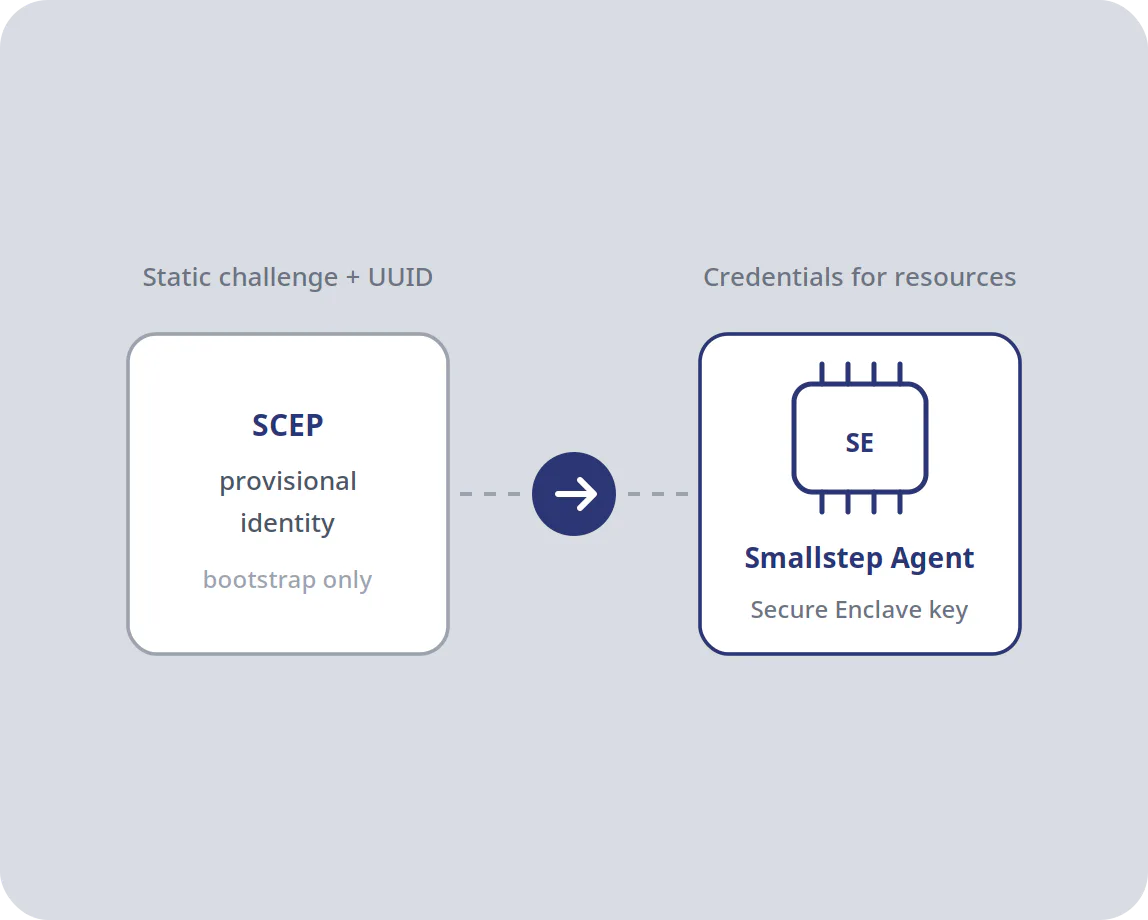
Use Mosyle’s SCEP certificate only to bootstrap device identity

Mosyle’s SCEP payload uses a static challenge, so Smallstep limits its role to initial enrollment. The certificate it delivers is a provisional identity, tied to the device’s Mosyle UUID, that lets the Smallstep Agent begin enrolling. Smallstep then establishes the Mac’s device identity, with keys held in the Secure Enclave. Where you need the stronger proof, Mosyle can also deliver Apple’s ACME payload for Managed Device Attestation.

Zero-touch for end users

Once administrators connect Mosyle and roll out the integration, Mosyle installs the Smallstep Agent with its configuration and login item, and pushes the Wi-Fi profile Smallstep provides. From then on, Macs in your inventory receive trust anchors, credentials, and network settings with no end-user steps. In one customer deployment, a fresh device reached active authentication in about five minutes.

Hands-free certificate management

Renewals run on their own. Smallstep renews each credential before it expires and stops issuing to any Mac that leaves your Mosyle inventory. Short-lived certificates keep access tied to the device’s current standing, reduce admin workload, and remove the missed renewals that cause surprise outages.

Decouple device identity from your MDM

Smallstep keeps one device inventory across Mosyle, Jamf, Intune, Workspace ONE, and other supported MDMs, and adds Linux endpoints by API. Authorities, credential policies, and protected resources are defined in Smallstep, not in any one MDM. Changing MDMs still means connecting the new one, resyncing inventory, and redeploying profiles, but not rebuilding your PKI.

Add hardware-backed identity to your Mosyle fleet

See the integration running against your own Mosyle device groups.

Book a demo

FAQs Smallstep for Mosyle

Mosyle manages device enrollment, configuration, and policy for your Apple fleet, along with its own security and compliance features. Smallstep adds certificate-based device identity and certificate lifecycle management for authenticating Macs to resources: a certificate authority that issues only to approved devices from your synced inventory, keys generated in the Secure Enclave, and automated renewal and offboarding.

Wi-Fi, VPN, and applications then enforce that identity through EAP-TLS, mutual TLS, VPN certificate authentication, or an identity provider integration.

You create an API token in Mosyle under Organization, Integrations, Mosyle API Integration, then give Smallstep that token plus the email and password of a Mosyle administrator account. Use a dedicated administrator account scoped to the device groups you sync, so its credentials can be rotated independently. Smallstep runs a partial inventory sync every hour and a full sync every eight hours.

Smallstep then provides the root certificate, SCEP URL, and SCEP challenge that you add to Mosyle as a certificate profile and a SCEP profile. The Connect Mosyle tutorial walks through each step.

A static challenge is an enrollment secret shared by every SCEP payload, so on its own it says nothing about which device is asking. Smallstep limits its role accordingly. The SCEP certificate Mosyle delivers is a provisional identity, tied to the device's Mosyle UUID, and it is used only to let the Smallstep Agent begin enrollment. The credentials that reach Wi-Fi, VPN, and applications are issued afterward, from the device identity the agent establishes with keys in the Secure Enclave.

With MDMs that support dynamic challenges, such as Jamf Pro, Intune, and Workspace ONE, Smallstep uses a unique, single-use challenge per device instead.

Mosyle distributes the Smallstep Agent as an installer package, alongside a configuration profile that carries your team slug and a login item that keeps the agent running. The agent supports Apple silicon Macs (M1 or later) running macOS 13 or later, installed for a single user, and uses the provisional certificate from the SCEP profile to enroll with your Smallstep team. Intel Macs in your Mosyle fleet are outside this path.

The agent generates its keys in the Secure Enclave, but agent-based enrollment cannot itself prove to Smallstep that a key resides in a genuine Apple Secure Enclave, so Smallstep classifies those credentials as Smallstep attested. The stronger proof comes from Apple’s Managed Device Attestation through an MDM ACME payload. Mosyle can deliver that payload; Smallstep supports it for Wi-Fi on supervised Apple silicon Macs and documents the setup with Jamf Pro today, Mosyle next.

The integration is documented for Mosyle Business tenants; ask us about Mosyle Manager and Fuse. Devices must be assigned to a device group in Mosyle to sync. Macs outside any device group do not appear in your Smallstep inventory, so they cannot enroll. Synced devices are not approved automatically by default. Your enrollment policy decides whether they wait for an administrator’s review or are approved based on their source. Use device groups to scope a pilot, then widen the assignment as you roll out. The Mosyle administrator account behind the integration needs access to every group you want to sync.

The agent is what turns the provisional SCEP identity into a Smallstep device identity with keys in the Secure Enclave. It also manages credentials in user space, such as browser TLS, SSH, VPN, and identity provider integrations, and renews them in the background. A Wi-Fi-only rollout can skip the agent: with Mosyle’s SCEP profile the credential is inventory-checked but not hardware-attested; with the ACME payload it is device attested.

Many applications cannot use hardware-bound keys directly. For those, the agent issues short-lived provisioned credentials, authenticating to the CA with its own hardware-bound key. Assurance levels vary by application and platform, and Smallstep publishes that matrix in its documentation.

Smallstep issues EAP-TLS client certificates only to approved devices from your synced inventory and can host the RADIUS service or work with your own. In Mosyle, you upload the profile Smallstep generates for your network as a custom profile and assign it to your device groups. Users join the network without passwords.

Smallstep replaces VPN passwords and exportable certificate files with device-bound credentials. The Smallstep Agent manages IPsec VPN connections directly, and Smallstep supports native certificate authentication and RADIUS/EAP-TLS for VPNs based on SSL/TLS and IKEv2. Confirm support for your specific gateway during evaluation.

Smallstep runs a partial sync from Mosyle every hour and a full sync every eight hours. Once a device drops out of that inventory, Smallstep stops issuing and renewing its credentials, and short certificate lifetimes limit how long existing ones stay useful.

Where you need an immediate cutoff, Advanced Authorities support active revocation through CRL and OCSP, which takes effect only where the relying party, such as your RADIUS server or VPN gateway, checks revocation status.

Yes. Smallstep syncs devices from Mosyle, Jamf, Intune, Workspace ONE, Fleet, Google Workspace, and other supported MDMs into one inventory, and your authorities and protected resources are defined in Smallstep. Adding or replacing an MDM still takes work: connecting its inventory sync, redeploying bootstrap and configuration profiles, and re-enrolling devices through the new channel. What you avoid is standing up a new certificate authority and new trust anchors for your Wi-Fi, VPN, and applications.

Mosyle manages Apple devices, so Windows fleets usually connect through Intune or Workspace ONE, which Smallstep syncs into the same inventory. Admins can add devices that are not in an MDM, including Linux endpoints, through the Smallstep API, and users can self-register a device with the agent, which by default requires an administrator’s approval. Linux devices with a TPM attest the same way Windows devices do.

Every certificate traces to a device in your inventory and the policy that authorized it, instead of to a shared challenge password. That gives auditors a device-level record of what could reach Wi-Fi, VPN, and internal apps, and supports controls that call for authenticating devices as well as users.

Smallstep's hosted CA is reachable from the public internet, so Macs enroll and renew credentials wherever they are, without a VPN connection back to an on-premises SCEP server.

Windows 10 or later with TPM 2.0, macOS 13 or later on Apple silicon, and enterprise Linux distributions with TPM 2.0. Windows Home editions are not supported. ChromeOS is handled through a separate configuration path with Google Workspace rather than through the agent. Requirements are in the agent documentation.

Yes, and on an Advanced Authority it can adopt your existing root CA rather than forcing a new trust anchor. Backwards-compatible SCEP and NDES support keeps legacy workloads running during the move; see the AD CS page.